
WH52 Compatibility List and Latest Firmware RequirementsUpdated a month ago
A concise FAQ explaining WH52 compatibility requirements, firmware dependencies, sensor channel limits, and expected measurement variations due to installation conditions and soil characteristics.
Q1: Why can't my gateway detect the WH52?
The most common reason is that your gateway or console firmware is outdated.
WH52 support was added through firmware updates on compatible Ecowitt devices. If the firmware version is below the required version, the sensor may not be recognized or displayed.
Please update your gateway or console to the latest firmware version before pairing the WH52.
After updating:
Reinstall the battery in the WH52.
Wait approximately 2 minutes for a new transmission.
Check the Sensor ID page in the Ecowitt App.
Verify that the WH52 appears in the sensor list.
Q2: What firmware version is required for WH52 support?
The following firmware versions (or later) are required for full WH52 support:
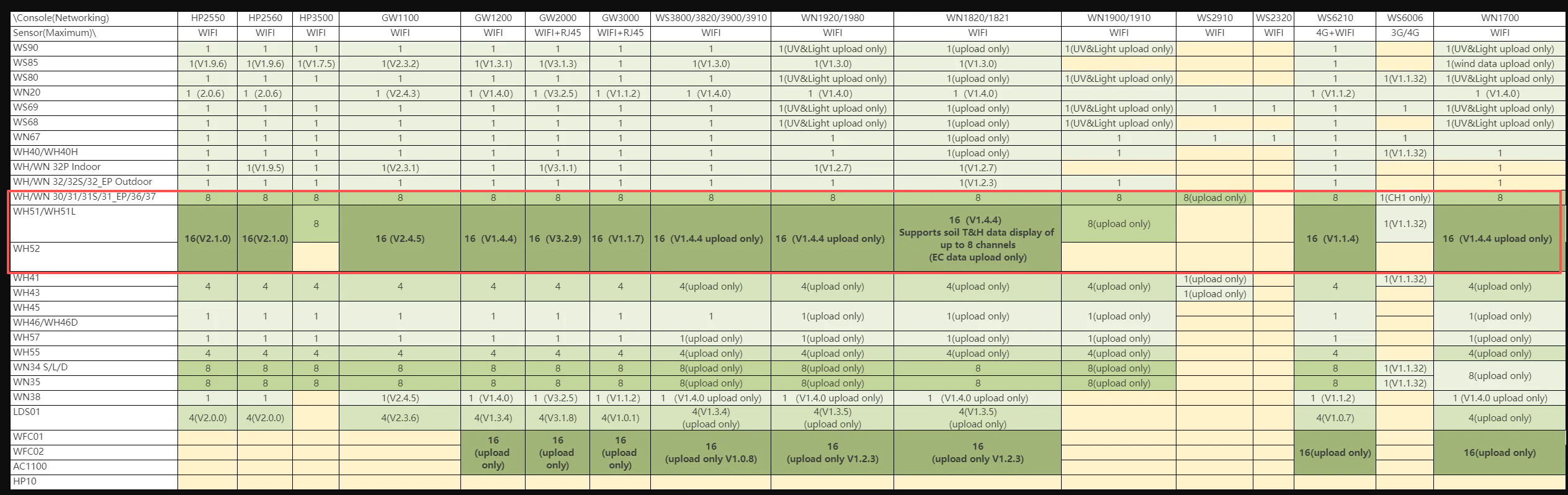
| Device | Minimum Firmware Version |
|---|---|
| HP2550 | V2.1.0 |
| HP2560 | V2.1.0 |
| GW1100 | V2.4.5 |
| GW1200 | V1.4.4 |
| GW2000 | V3.2.9 |
| GW3000 | V1.1.7 |
| WS3800 / WS3820 / WS3900 / WS3910 | V1.4.4 (Upload Only) |
| WN1920 / WN1980 | V1.4.4 (Upload Only) |
| WN1820 / WN1821 | V1.4.4 (Supports soil T&H display for up to 8 channels, EC upload only) |
| WS6210 | V1.1.4 |
| WN1700 | V1.4.4 (Upload Only) |
Notes:
WH52 shares soil sensor channels with WH51 and WH51L.
Most(not all) compatible gateways support up to 16 soil sensor channels after firmware update.
Some display consoles only support partial local display of WH52 data, while full data remains available via Ecowitt App and Ecowitt.net.
We strongly recommend upgrading to the latest available firmware, even if your current version already meets the minimum requirement.
Q3: How many WH52 sensors can I use?
The maximum number of WH52 sensors depends on your gateway model and firmware version.
Most compatible gateways support up to 16 soil sensor channels after firmware updates.
Please note:
WH52 shares channels with WH51 and WH51L sensors.
The combined total number of WH51, WH51L, and WH52 sensors cannot exceed the maximum channel limit supported by your gateway.
Examples:
16 × WH52
8 × WH52 + 8 × WH51
10 × WH52 + 6 × WH51L
All of the above configurations use 16 soil sensor channels.
Q4: Why are the moisture readings from WH51 and WH52 very different even when they are placed in the same flower pot?
The most common reason is the sensor placement location.
Even within the same flower pot, soil moisture is not distributed perfectly evenly. Our tests show that when a WH51 and a WH52 are installed approximately 10 cm (4 inches) apart, the moisture readings can differ by as much as 11%–12%.
However, when the two sensors are inserted side-by-side in nearly the same location, their readings become very close.
For the most accurate comparison:
Insert both sensors at the same depth.
Place them immediately next to each other.
Avoid comparing readings from different areas of the pot or garden bed.
Small differences in soil structure, root density, and water distribution can significantly affect moisture measurements.
Q5: Why did the moisture reading change after I moved the sensor?
This is normal.
Moving a soil sensor disturbs the surrounding soil and changes the local distribution of water around the probe. As a result, the moisture reading may increase or decrease immediately after repositioning.
Factors that can influence the reading include:
Soil compression around the probe
Air gaps created during installation
Redistribution of water in the disturbed soil
Differences in root density or soil composition
After moving the sensor, we recommend watering the soil if necessary and allowing the soil structure to stabilize before comparing readings.
Q6: Will WH51 and WH52 eventually show the same moisture value?
Generally, yes.
Long-term comparison tests show that after the sensors remain undisturbed and the soil has stabilized for approximately 12 hours, the readings become very similar.
In our tests, the WH52 moisture reading was typically only about 3% lower than the WH51 reading after stabilization.
This small difference is within the expected range for two different sensor designs and is usually not significant for irrigation management.
For practical applications, both sensors provide highly consistent trends and can be used together to monitor soil moisture conditions effectively.
Important: Soil moisture sensors are intended to indicate soil water trends rather than provide an exact laboratory measurement. When evaluating sensor performance, focus on consistency and trend changes over time rather than expecting identical readings from different sensor models.